Website speed optimization
Website speed optimization for hypnotherapists
Is your practice website slow on a phone? I find out exactly what’s holding it back, fix it properly on WordPress and show you the before-and-after numbers. You get a free speed check first, then a fixed price, and nothing changes on your live site until it has been tested.
WordPress, Elementor and other page builders · Core Web Vitals · before-and-after report
Why speed matters
A slow website costs you consultations, not just a score
Most people find a hypnotherapist on their phone, often while feeling anxious or stuck. If the page takes too long, they go back to Google and pick the next practice.
01
First impressions happen on mobile
Your future clients usually see your site on a phone, sometimes on a weak connection. A page that loads in a blink feels calm and professional. One that hangs feels uncertain.
02
Fewer people reach your booking button
Every extra second gives a visitor another moment to leave before they read about your approach or see the free consultation button.
03
Google measures page experience
Core Web Vitals (loading, responsiveness and visual stability) are part of the page experience signals Google’s ranking systems use. Helpful content still matters most, but a slow site makes good content harder to find.
Signs to look for
Is your website slow?
You don’t need to be technical to spot the warning signs. If two or more of these sound familiar, a speed check is worth it.
Not sure? Request a free review and I’ll test your site on mobile and desktop for you.
- Your mobile score in Google PageSpeed Insights is orange or red
- The large image or slider at the top takes a few seconds to appear
- Text or buttons jump around while the page is loading
- Your site was built with a page builder and lots of add-on plugins
- A booking calendar, chat widget or video makes pages noticeably slower
- Search Console shows “Poor” or “Needs improvement” URLs under Core Web Vitals
- You’re on a very cheap shared hosting plan that hasn’t been reviewed in years
What I fix
Speed optimization, done properly
Not just another caching plugin on top of the problem. I find the real causes and fix them in the right order.
Images and video
- Compress and resize images to the size they’re actually shown at
- Modern formats such as WebP, with fallbacks where needed
- Lazy-load images below the fold, but never the main hero image
- Click-to-play video, so testimonial videos don’t load until someone presses play
Caching, hosting and server
- Page caching and browser caching set up for your host
- A CDN where it genuinely helps
- Up-to-date PHP version and database clean-up
- Honest hosting advice if your current plan is the bottleneck
Plugins, scripts and fonts
- Remove or replace heavy and unused plugins and page builder add-ons
- Load chat, booking and other third-party scripts only when needed
- Self-hosted fonts with only the weights you use
- Unused CSS and JavaScript reduced where it’s safe to do so
Core Web Vitals
- Largest Contentful Paint (LCP): the main content appears quickly
- Interaction to Next Paint (INP): buttons and menus respond without delay
- Cumulative Layout Shift (CLS): nothing jumps around while loading
- Checked on mobile and desktop, in PageSpeed Insights and Search Console
Proof
Real results from my own website
Before I touch anyone else’s site, I hold my own to the same standard. These are real test results for sulemanshabir.com, not a mock-up.
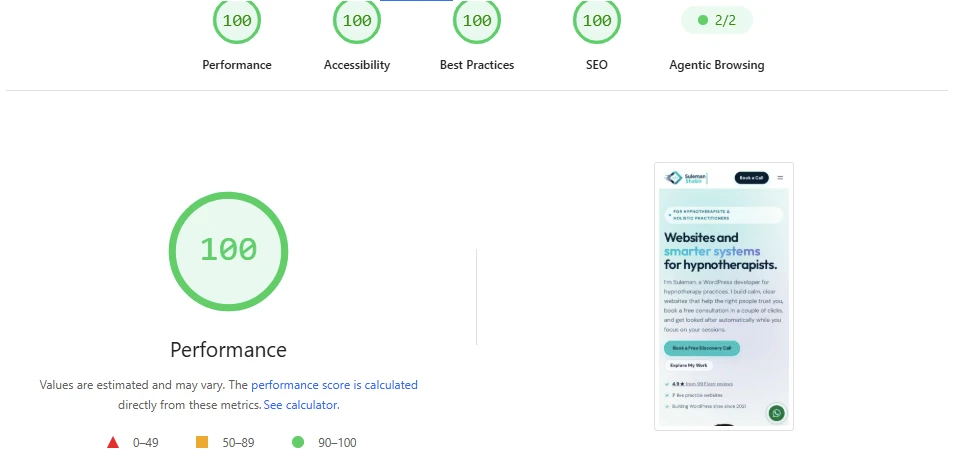
Mobile test results
| Metric | My result | Google’s “good” target |
|---|---|---|
| Largest Contentful Paint | 1.1 s | 2.5 s or less |
| Total Blocking Time | 0 ms | 200 ms or less |
| Cumulative Layout Shift | 0.001 | 0.1 or less |
| First Contentful Paint | 1.1 s | 1.8 s or less |
Scores vary a little from test to test. What matters is that your real visitors get a fast page every time.
How people ask
Problem, fix and result
Here’s how common speed problems on practice websites map to what I do about them.
| The problem | What I do | What it improves |
|---|---|---|
| A huge hero image or slider | Resize, convert to WebP, preload the main image, replace sliders with one strong image | Largest Contentful Paint |
| Dozens of plugins and add-ons | Audit every plugin, remove what isn’t needed, replace heavy ones | Load time and responsiveness |
| Booking widget or chat on every page | Load it only where it’s needed, or when someone clicks | Interaction to Next Paint |
| Fonts and ads shifting the layout | Reserve space, self-host fonts, set image sizes | Cumulative Layout Shift |
| Slow server response | Page caching, PHP update, database clean-up, hosting advice | Time to first byte |
My process
How a speed project works
01
Free speed check
I test your key pages on mobile and desktop, look at Search Console if you have it, and tell you in plain English what’s slowing the site down.
02
Fixed quote
You get a fixed price for the agreed fixes, a timeline and a clear list of what’s included. No hourly surprises.
03
Backup and safe testing
I take a full backup first and make risky changes on a staging copy, so your live site and bookings keep working.
04
Fix and re-test
I make the changes, then check forms, booking, menus and layouts on real phone sizes before anything goes live.
05
Before-and-after report
You get the numbers before and after, a list of everything I changed and tips to keep the site fast.
What you get
A faster site and the evidence
- PageSpeed Insights results for your key pages, before and after
- Core Web Vitals checked on mobile and desktop
- A plain-English list of every change I made
- Working forms, booking and analytics, tested after the changes
- Advice on keeping the site fast as you add content
Honest approach
What I won’t do
- Promise a perfect 100 score on every page
- Stack several speed plugins that fight each other
- Hide problems from testing tools instead of fixing them
- Remove features you rely on, like booking or testimonials, without asking
- Push you into new hosting unless it’s really the bottleneck
Related services
Speed is one part of a healthy website
Speed work fits naturally with my other services. If people can’t find you in the first place, start with SEO for hypnotherapists, where speed is one of the technical foundations.
Once your site is fast, a website care plan keeps it that way with monthly updates, backups and checks. And if the site is too old or heavy to be worth fixing, a website redesign may cost less in the long run. I’ll tell you honestly which makes more sense.
Every new website I build is fast from day one. You can see examples in my case studies, and prices on my pricing page.
FAQ
Questions about website speed
Something else on your mind? Send me a message or book a free call.
How fast should a hypnotherapy website load?
As a practical target, the main content should appear within about 2.5 seconds on a mobile phone. That’s Google’s “good” threshold for Largest Contentful Paint. Buttons should respond almost instantly, and nothing should jump around while the page loads.
How much does website speed optimization cost?
It depends on what’s causing the problem, so I start with a free speed check and then send a fixed price for the agreed fixes. You’ll know the full cost before any work starts.
Will a faster website improve my Google rankings?
Speed is one of many signals, and Google says helpful content matters most. A faster site removes a technical obstacle and makes visitors more likely to stay and book, but nobody can honestly guarantee a ranking change from speed alone.
Can you speed up an Elementor or Divi website?
Yes. Page builders are a common cause of slow WordPress sites, but they can usually be made much faster with the right settings, fewer add-ons and lighter page structures. If a site is beyond saving, I’ll tell you.
Do I need to change my hosting?
Not always. Many sites get much faster on the same hosting. If your plan really is the bottleneck, I’ll explain why and suggest options, and the choice stays yours.
Will my booking system, forms and videos still work?
Yes. I test forms, booking links, menus and videos after every change, and risky changes are made on a staging copy first.
What access do you need?
Usually an administrator account on your WordPress site and, if needed, access to your hosting dashboard. You can add me as a user, so you never have to share your own password.
How do I keep my site fast afterwards?
I’ll give you simple guidelines, for example how to size images before uploading. A care plan includes regular checks so the site doesn’t slowly get heavier.
Do you work on websites you didn’t build?
Yes. Most speed projects are on sites built by someone else. I start with the speed check so I can see how the site is put together.
Find out what’s slowing your website down
Request a free speed check, or book a call and we’ll look at your site together.